


CommCare
4.414.00 Reviews
App Specs
- Version
- 2.63.0
- Updated On
- License
- Free
- Downloads
- 1,000,000+
- Developer
- Dimagi, Inc.
- Categories
- Libraries & Demo
- Platform
- Android
Screenshots

 Analysis by AppCompare
I find CommCare easiest to understand when I think of it as a guided work tool rather than a general-purpose health app. It is built for frontline service teams that need to follow a defined process, record what happened, and keep track of people or cases. That distinction matters: it can be a strong fit when an organization has designed a workflow for its staff, but it is not simply a ready-made medical reference or a personal health tracker.
Where the daily workflow begins
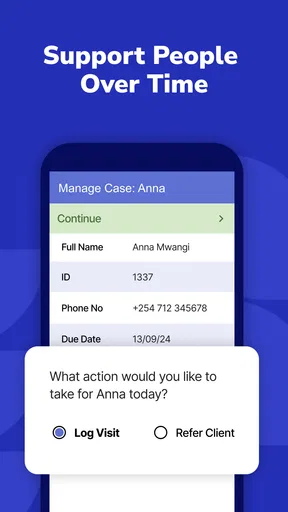
In ordinary use, the first question is not just what information to enter, but which workflow your organization has set up and what each step expects. A field worker might open a case, complete a form during a visit, and record the outcome so the team can follow up later. Keeping that sequence consistent is one of the app’s practical strengths: it helps turn a busy visit into a repeatable record instead of a collection of notes that must be deciphered afterward.
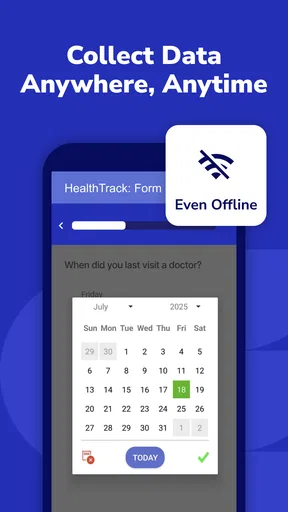
A realistic day could involve visiting several households, completing the relevant checks, and adding a short note or media file when a detail needs context. If the connection drops between visits, the offline capability lets the worker continue recording information and sync later when a connection is available. I would still make a habit of checking that queued work has synchronized before treating the day’s records as fully shared with the team; offline entry is useful, but it does not remove the need for a reliable handoff.
Habits that make the app easier to use
The best way to get comfortable is to learn the order of the forms used most often, rather than tapping around in search of a shortcut. Before heading into the field, I would review the assigned workflow, make sure I understand which fields are required, and confirm that the device is ready for the work. That small routine reduces avoidable pauses during a visit, especially when a person is waiting while the worker tries to remember what comes next.
For teams, consistency is more useful than speed alone. Agreeing on how to record common answers, when a note needs extra context, and who is responsible for reviewing a case can make the collected information easier to act on. A form can standardize what gets captured, but the people using it still need a shared understanding of what the answers mean. That is a team practice, not something an interface can settle by itself.
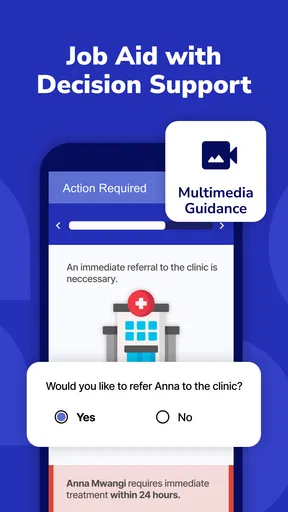
Multimedia can help when a written answer would be ambiguous, but I would use it selectively. A photo, video, or audio file should have a clear purpose in the record, not be attached simply because the option exists. This keeps the workflow focused and avoids creating extra material that colleagues may have to sort through. It also makes sense to follow the organization’s own guidance on what is appropriate to record and how to handle that material.
Settings and preparation worth checking
Because CommCare is designed around workflows that organizations configure, the experience can vary depending on the setup provided to a worker. Before relying on it for a task, I would check which forms and cases are available, whether the intended process is clear, and how the team expects completed work to be reviewed. If a form seems to ask for something unclear or unnecessary, asking the supervisor or administrator is better than guessing; a confident but inconsistent answer can be harder to fix later.
Worth Reading Before You Choose

Flipboard Shows What News Apps Must Do Beyond the Feed

Switching to Android Auto Means Rethinking Your Driving Routine

Google Calendar Makes a Crowded Week Easier to Manage

Ludo King Makes the Most of the Minutes Between Plans

Baby Panda World Brings Quick Play to Modern Phones, but Its Game Library Feels Busy

ESPN’s Live Game View Makes Following Close Games Easier
Connectivity is another practical consideration. If visits may take place outside reliable coverage, prepare for offline work in advance and build a routine for syncing once the device is back online. I would not assume that entering a record and sharing it with colleagues are the same moment: a worker can capture information offline, while the wider team may not see it until synchronization happens. Planning around that gap is especially important when someone else needs to follow up promptly.
What is CommCare?
At its core, CommCare is a mobile platform tailored for frontline workers. It's built to enhance service delivery through its customizable forms and workflows. It's like having a digital assistant in your pocket, ready to streamline your tasks. From health data collection to patient tracking, it covers a wide range of needs. What makes it stand out is its adaptability to different environments and requirements, whether you're dealing with maternal health, nutrition, or disease monitoring.
User Experience and Interface
Now, let's talk about the user experience. When you first fire up the app, you're greeted with a clean and intuitive interface. Even if you're not a tech wizard, navigating through the menus is a breeze. The app's design is straightforward, allowing you to focus more on your work and less on figuring out how to use it. The forms are easy to fill, with drop-down menus and checkboxes making data entry quick and painless.
One feature I particularly love is the offline capability. In areas with spotty internet, this is a lifesaver. You can still collect and store data without a hitch, and once you're back online, it syncs seamlessly. It’s like magic, but better because it actually works!
Customization and Flexibility
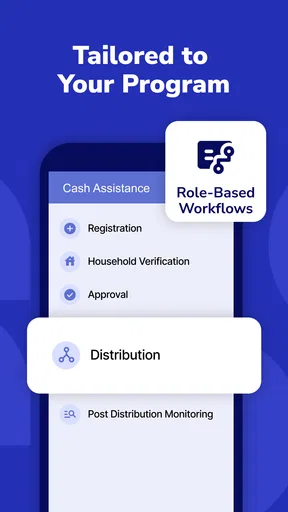
One of the standout features of CommCare is its ability to be customized to fit specific needs. Whether you're dealing with a public health crisis or conducting routine check-ups, you can tailor the app to suit your workflow. The form builder is incredibly flexible, allowing you to create forms that capture exactly what you need. This flexibility is a huge plus for organizations that need to adapt quickly to changing circumstances.
Plus, it’s not just about data collection. The app supports multimedia, so you can attach photos, videos, and even audio files to your records. This is particularly useful in scenarios where visual documentation is crucial.
Choosing it over simpler tools
Compared with paper forms, the main appeal is having a structured digital record that can support case tracking and later synchronization, rather than relying on handwritten sheets that must be gathered and interpreted. Compared with a basic note-taking app or spreadsheet, the advantage is the guided workflow: staff can be prompted to capture information in a consistent sequence. But those simpler tools can be better for a person who only needs to jot down occasional notes, or for a small team without a defined service process. A more elaborate system is not automatically the better choice if nobody needs its workflow structure.
It is also worth separating the mobile experience from the work of designing the process. Customizable forms are valuable when an organization has someone who can plan and maintain them; they are not a guarantee that every worker can reshape a workflow on the spot. If the configuration is confusing, the app may feel like extra administration rather than support. I would judge the fit by trying the actual forms the team intends to use, not by assuming that flexibility alone will make a setup effective.
Who benefits most, and where it can frustrate
I would recommend it most readily to frontline workers and organizations that need repeatable data collection, follow-up, and records that can be completed away from a steady connection. Its focus is particularly relevant when visits or service delivery have several steps and different workers need to record information in a consistent way. The app’s practical value depends on that organized use: a team that has clear procedures can get more from it than an individual looking for a simple standalone utility.
On the other hand, someone seeking a personal appointment diary, a general medical encyclopedia, or a lightweight way to keep private notes may find this more structured than necessary. It is also a weaker fit if the organization has not explained its workflows or does not have a plan for reviewing and syncing collected records. In those situations, a basic form or note tool may be easier to adopt, even if it offers less support for case-based work.
Integration and Support
With any app, integration with existing systems is key, and CommCare excels here. It plays well with other software, making data transfer and management a breeze. If you're worried about tech support, the app comes with a robust support system, including an online community and detailed documentation. Plus, the team behind CommCare is known for being responsive and helpful, which is a huge relief when you're in the field and need assistance.
What to clarify before relying on it
A few sensible questions are worth answering before a team makes this part of its daily routine: who configures the forms, who checks completed records, and what should a worker do when an answer does not fit the available choices? Those decisions shape whether the app feels smooth or restrictive. I would also ask how staff should handle a record that was entered offline but needs timely attention, so everyone knows whether to wait for synchronization or use an agreed alternative to alert a colleague.
Version compatibility is another straightforward check before installing it on a work device. The current release is 2.63.0, and it requires Android 6.0 or later. The app is free, has an Everyone age rating, and is published by Dimagi, Inc. Those details make it accessible to a broad range of users, though an organization should still check that its own devices and configured workflows are ready before depending on it in the field.
Real-World Impact
What truly sets CommCare apart is the real-world impact it has. From improving health outcomes to enhancing data accuracy, the app is making a tangible difference. Health workers have reported improved efficiency and better patient management thanks to the app’s comprehensive features. It’s not just about collecting data; it’s about making data work for you to improve lives.
In many communities, the app has been pivotal in tracking and managing health campaigns, from vaccinations to disease outbreaks. It’s empowering health workers to make informed decisions, ultimately leading to better care and healthier communities. The stories coming out of these regions highlight the app’s potential to transform health services.
Conclusion
In conclusion, CommCare is a robust, versatile tool that is proving its worth in the field. Whether you're a health worker looking to streamline your processes or an organization aiming to improve service delivery, this app has got you covered. It’s not just an app; it’s a partner in your mission to provide better healthcare.
So, if you're in the market for an app that combines functionality, flexibility, and impact, give it a spin. You’ll wonder how you ever managed without it!
My final recommendation
There is a strong practical idea at the center of this app: give frontline teams a structured way to carry out work and record it, including in places where a connection is unreliable. Its usefulness is not automatic, though. It depends on forms that match the real job, workers who understand the process, and a sensible routine for reviewing and syncing entries. I would try it when those pieces are in place, and choose a simpler tool when the need is only occasional note-taking.
Its audience is also reflected in its reach and reception: CommCare has more than 1 million installs and an average rating of 4.4 from around 4,100 ratings. It was released on June 22, 2012, and remains a specialized choice in the libraries-and-demo space rather than a general-purpose consumer health app. For the right team, that specialization is precisely the point; for everyone else, it is a reason to look elsewhere.
Pros
- User-friendly interface for easy navigation.
- Supports offline data collection.
- Customizable forms for diverse needs.
- Strong data security features.
- Excellent customer support.
Cons
- Steep learning curve for new users.
- Requires stable internet for updates.
- Limited integrations with other apps.
- Occasional performance lags.
- Higher cost for premium features.
FAQs for CommCare
What is CommCare and who is it for?
CommCare is a mobile platform designed to assist healthcare workers and organizations in managing and tracking patient care. It is particularly beneficial for those working in low-resource settings. The app supports data collection, case management, and performance monitoring, making it an essential tool for community health workers, NGOs, and healthcare providers.
Can CommCare be used offline?
Yes, CommCare supports offline functionality, which is crucial for users in areas with limited or unstable internet connectivity. Users can collect data, manage cases, and perform other tasks without an internet connection. Once connected, the app syncs the data to the cloud, ensuring information is safe and up-to-date.
Is CommCare customizable for specific organizational needs?
CommCare offers a high level of customization to meet various organizational requirements. Users can create tailored forms, workflows, and reports to suit specific needs. This flexibility allows organizations to adapt the app for different projects, whether it’s for health, agriculture, education, or other sectors.
What are the pricing options for CommCare?
CommCare offers different pricing tiers to accommodate varying organizational sizes and needs. There is a free version available with basic features, and paid plans that provide additional functionality, support, and integration options. Organizations can choose a plan that aligns with their budget and operational requirements.
How secure is the data collected through CommCare?
Data security is a priority for CommCare. The platform employs industry-standard encryption protocols to protect data during transmission and storage. Additionally, user authentication and role-based access controls ensure that only authorized personnel can access sensitive information, providing peace of mind for organizations handling confidential data.


